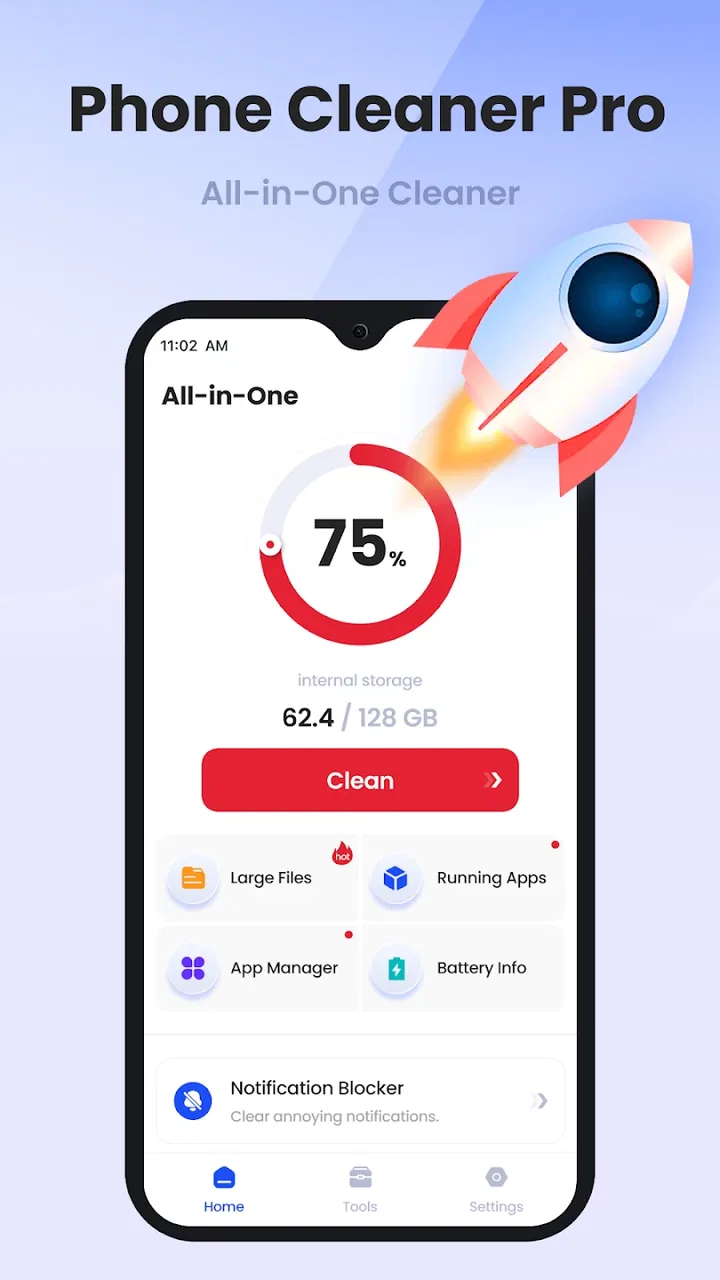
Phone Cleaner Pro
- 4.3
- Rating
- 5.00M
- Installs
- Free
- Price

 Analysis by App-foxy
Cleaning a phone sounds simple until the storage warning appears at the worst possible moment. I installed Phone Cleaner Pro to see whether it makes that job easier, and my first impression was that its value depends less on dramatic “boosting” claims and more on how carefully you use it. This is a free Android tools app from Metanoz, built around the straightforward idea of helping you find unwanted files and reclaim space.
The app is aimed at everyday Android users rather than technicians. Its store summary describes it as a comprehensive phone-cleaning application, while its shorter description keeps things even simpler: Phone Cleaner. That modest positioning suits the experience. I found it most useful when I treated it as a visual guide to storage cleanup, not as a magic repair button. The safest way to use it is to review what it identifies before removing anything.
Where Phone Cleaner Pro users are most likely to get stuck
The first point of friction is expectation. A cleaner can locate clutter, but it cannot turn an older phone into a new one, repair damaged hardware, or create permanent free space when the same large files continue to return. If you open Phone Cleaner Pro expecting one tap to solve every performance problem, the result may feel underwhelming. If your goal is to understand where storage is going and make deliberate room, the app makes more sense.
You May Also Like

 Blood Strike: 2.5 Anniversary
Blood Strike’s Loadouts Turn Every Drop Into a Tactical Gamble
A close look at Blood Strike’s custom loadouts: how fast access to signature weapons reshapes its battle royale rhythm, rewards preparation, and narrows the gap between fights.

 Pandora - Music & Podcasts
Pandora’s Music Is Easy to Start, but Harder to Recover
Pandora’s strength is its low-effort path from a seed to a station. Its weak spot is how much confidence it asks you to place in connection, setup, and quiet recovery.

 8 Ball Pool
 Is Built on Rivalries, Rematches, and Routine
A close look at the rivalries, rematches, shared routines, and unanswered safety questions that turn a quick pool match into a persistent mobile community.

 Samsung Music
’s Quiet Strength Is Playing What You Already Own
Its reach comes less from spectacle than from dependable access to a personal library. That simplicity is both the app’s strongest retention engine and its ceiling.

 AccuWeather: Weather Radar
AccuWeather Review: A Quick, Clear Forecast for Everyday Decisions
For everyday plans, the best forecast is the one you can understand quickly. AccuWeather makes rain timing, radar, and local conditions easy to act on, with a few trade-offs.

 Hill Climb Racing
Why Hill Climb Racing Still Turns Crashes Into One More Run
A tiny car, a bumpy hill and one more upgrade: Hill Climb Racing keeps resurfacing because its simple chaos makes every near-miss feel personal.
More From Our News Desk



Another common stumbling block is the scan itself. A cleaning app needs access to the files it is expected to examine, and Android may show system prompts before the process can work properly. I recommend reading each prompt rather than tapping through it automatically. If the app cannot inspect the relevant areas, its results may be incomplete; if you deny something by mistake, the problem may look like a failed scan when it is really a setup issue.
There is also a difference between finding a file and knowing whether it is safe to delete. A thumbnail, download, temporary item, or duplicate-looking file may be replaceable, but a document, offline map, voice recording, or work attachment may matter to you even if its name looks unimportant. Phone Cleaner Pro can help bring candidates to your attention, but the final decision still belongs to you.
I would be particularly careful with folders connected to messaging and social apps. Those folders can grow quickly, yet they may contain photographs or videos you still want. Before approving a large cleanup, I would open the relevant preview or file details where available and confirm that the original exists somewhere else. A cleaner is most useful when it reduces searching, not when it encourages blind deletion.
Why a scan can appear less useful than expected
Storage categories are not always intuitive. Android may reserve space for system components, applications may keep their own internal data, and cloud-backed content may still have a local copy. Even after a successful cleanup, the storage screen may not change immediately. I would give the phone a moment, close and reopen the storage view, and check whether the freed space is reflected there before running the same cleanup repeatedly.
Repeated scans can also produce a confusing impression. Some cache-like material is recreated as apps open, so a later scan may find new temporary files without meaning that the previous cleanup failed. This is one of the less obvious trade-offs of using any cleaner: removing every temporary item can sometimes make an app rebuild resources later, while leaving a small amount in place may make reopening it feel faster.
My practical rule is to use the app when storage pressure is real, not as a nervous habit several times a day. A phone with plenty of free space is unlikely to benefit from constant cleaning, and frequent deletion can create unnecessary decisions. The app becomes more valuable when you are preparing for a system update, recording a long video, downloading offline content, or trying to install a large application.
Setup checks that prevent avoidable problems
Phone Cleaner Pro supports Android devices running version seven or later, so compatibility is broad enough for many phones still in regular use. The current release is version 1.0.20. Before blaming the app for a missing result, I would first confirm that the phone is supported, that the application has finished installing correctly, and that Android itself is not displaying a pending update or storage warning that changes how the scan behaves.
It is also worth starting with a little preparation. Close apps that are actively downloading or editing files, especially a camera, browser, or messaging client. If a file is being written while the cleaner scans, the result can change between the scan and the cleanup screen. Waiting until those activities finish gives you a more stable view and reduces the chance of removing something while another app is still using it.
Battery level matters in a practical sense even when the cleaning job is not especially complicated. A phone that is nearly empty may restrict background activity or interrupt a longer scan. I would connect the device to power if it is low, keep the screen available during the first scan, and avoid switching between several demanding applications at the same time.
Before touching a cleanup button, I would make a quick personal checklist. Photos that have not been backed up, downloaded tickets, school documents, recordings, and files received through chat deserve a second look. This is not busywork. It is the difference between removing clutter and losing something that is difficult to replace. Use the app to narrow the search, then use your own judgement to approve the deletion.
A sensible first session
My preferred first session is deliberately slow. I would launch the app, allow the scan to complete, read the categories it presents, and begin with items whose purpose is obvious. I would leave anything unfamiliar alone until I had checked it through the phone’s file manager or the app that created it. Starting with a small, certain cleanup gives you a useful test of the workflow without putting important personal data at risk.
If the app asks for access and you are uncomfortable with the wording, pause and inspect Android’s permission controls rather than guessing. The right choice depends on what you want the cleaner to examine. After changing a permission, return to the app and scan again instead of assuming the earlier result has updated automatically. This simple reset often prevents confusion.
I would also avoid judging the app solely by the size of the first number it presents. A large total may combine several kinds of material, and the most valuable cleanup may be a smaller group of files you already know you no longer need. The quality of a cleaning session comes from accurate choices, not from chasing the biggest possible figure.
Recovering when the workflow does not go smoothly
When a scan seems frozen, my first response is patience. A phone may be examining many folders, and moving immediately to repeated taps can make the interface feel less responsive. I would wait, keep other apps closed, and check whether the device is still reacting normally. If nothing changes, I would leave the app, reopen it, and try a fresh scan rather than repeatedly pressing the same control.
If the app closes unexpectedly, the usual safe recovery is simple: restart the phone, make sure other heavy tasks are finished, and open Phone Cleaner Pro again. I would not begin by deleting random files manually. A restart can clear a temporary system condition, while a clean second attempt tells you whether the issue was a one-off interruption or a repeatable problem.
For a result that looks incomplete, I would compare it with Android’s own storage settings. The built-in storage view is the better reference for the phone’s overall space allocation, while Phone Cleaner Pro can serve as a more focused aid for identifying material worth reviewing. If both views show the same pressure, the problem is probably genuine storage use. If they differ, I would trust neither blindly and inspect the largest categories manually.
One useful recovery habit is to change only one thing at a time. If you alter permissions, update the app, restart the phone, and delete files all at once, you will not know what fixed the issue. Instead, run a scan, note what happens, make one adjustment, and test again. This is slower, but it avoids turning a small setup problem into a confusing chain of changes.
A realistic everyday example
Imagine you are leaving for a trip and need room for several hours of offline entertainment plus new camera footage. I would use Phone Cleaner Pro the evening before, not while standing at the airport gate. First I would review large media and downloads, confirm that important photos and documents are backed up or otherwise safe, and remove only material I recognize. Then I would restart the phone if storage still looked unusually tight and verify the available space through Android’s settings.
This workflow shows where the app helps and where it does not. It can reduce the time spent hunting through scattered folders, but it cannot decide which travel documents are essential, and it cannot prevent a streaming app from downloading new content later. The human review remains the important part. The cleaner simply makes that review more manageable.
When the app is not the cause of the problem
Not every slow phone needs a cleaner. Performance problems can come from an aging battery, an application that is misbehaving, weak network service, overheating, or a system update that is still completing background work. Deleting files may improve space pressure while leaving the original cause untouched. If your phone is slow even with generous free storage, I would look beyond Phone Cleaner Pro.
App crashes deserve the same caution. If one application fails repeatedly, clearing its data or reinstalling it may be more relevant than running a general cleanup, but those actions can remove local settings or offline content. I would first check the affected app’s own storage controls and make sure important information is synchronized. A broad cleaner should not be the first tool for a narrowly targeted software fault.
Likewise, a battery that drains quickly is not automatically a storage problem. A cleaner may make the device feel less crowded, but it is not a replacement for checking battery usage, screen brightness, location activity, or a recently installed application. The same distinction applies to unwanted pop-ups or suspicious behavior: those symptoms call for security and application-management steps, not simply deleting temporary files.
This is where the usual alternatives have an advantage. Android’s built-in storage tools are closer to the operating system and are often the clearest place to see which applications, media groups, or system areas consume space. A file manager gives you more direct control and can be preferable if you already understand your folder structure. Phone Cleaner Pro is more approachable when you want a guided starting point, but experienced users may prefer the precision of native tools.
Cloud photo services can also solve a different part of the problem. They may help you keep copies elsewhere before removing local media, whereas a cleaner focuses on what is already on the device. Neither option replaces the other. If your phone is full because of personal videos, a backup-and-review routine is safer than treating every large file as disposable.
Who should use it, and who should skip it
I think Phone Cleaner Pro is a good fit for someone who finds Android storage screens confusing, regularly accumulates downloads, or wants a single place to begin reviewing clutter. It is also useful for family members who need a visual prompt before a phone update or a large recording session. Its free price makes trying that guided approach easy, and its Everyone age rating keeps the intended audience broad.
I would skip it if you are already comfortable with Android’s storage settings and a file manager, or if you need a specialist tool for duplicate photographs, backup automation, or device diagnostics. I would also avoid relying on it as a routine performance booster. The app’s strongest role is storage housekeeping; expecting it to solve unrelated hardware or software problems sets it up unfairly.
The app has attracted an average rating of 4.3 from roughly 8,500 ratings, with about 358 written reviews and more than 5 million installs. Those figures suggest that many people find the basic idea useful, but they do not remove the need for careful handling. A popular cleaner can still be the wrong choice for someone who wants complete manual control or who is especially cautious about reviewing every file independently.
My practical verdict after using it
Phone Cleaner Pro is best understood as a convenient first pass, not a permission slip to erase aggressively. I liked the way its purpose stays clear: open a cleaning tool, inspect what is taking space, and decide what can go. The experience is most satisfying when you have a specific reason to free storage and enough time to review the results calmly.
The main friction is not necessarily complicated navigation; it is the judgement required around the files it surfaces. Setup access, changing scan results, recreated temporary material, and the difference between storage pressure and general slowness all matter. Once you understand those limits, the app becomes easier to use responsibly. If a scan fails, recover methodically. If a result looks surprising, compare it with Android’s own storage view. If a file matters, protect it before cleaning.
For me, the deciding question is whether you want guidance or control. Phone Cleaner Pro offers guidance in a free package from Metanoz, and that is enough to recommend it to casual Android users who need help getting started. It is less compelling for advanced users who already know exactly which folders and applications need attention. My recommendation is to use it for occasional, reviewed cleanups—not automatic trust—and to keep Android’s native storage tools as your reality check.
With that approach, the app earns its place as a practical tool rather than an exaggerated cure-all. It can make a frustrating storage search more approachable, help you prepare for a space-hungry task, and point out candidates you might otherwise overlook. Just remember that the final safeguard is not the cleaning button; it is taking a moment to know what you are removing.
FAQs for Phone Cleaner Pro
01What features does Phone Cleaner Pro offer?
Phone Cleaner Pro provides a comprehensive suite of features to optimize your smartphone's performance. It includes junk file removal, memory booster, battery saver, and app manager. The app also offers advanced tools like CPU cooling and virus protection, ensuring that your device runs smoothly and efficiently at all times.
02Is Phone Cleaner Pro safe to use on my device?
Yes, Phone Cleaner Pro is designed with user safety in mind. It employs advanced security protocols to protect your personal data and privacy. The app undergoes regular updates to ensure compatibility with the latest Android and iOS security standards, minimizing any potential risks to your device.
03How does Phone Cleaner Pro improve battery life?
Phone Cleaner Pro enhances battery life by identifying and shutting down power-hungry background apps. It analyzes battery usage patterns and provides recommendations for optimizing settings. Additionally, the app includes a battery saver mode that extends your device's uptime by adjusting performance settings and minimizing resource consumption.
04Can Phone Cleaner Pro enhance gaming performance on my device?
Absolutely! Phone Cleaner Pro optimizes your device for gaming by freeing up RAM and clearing unnecessary background processes. This results in smoother gameplay and reduced lag. The app's game booster feature prioritizes system resources for gaming, ensuring an immersive and uninterrupted gaming experience.
05Does Phone Cleaner Pro require a subscription?
Phone Cleaner Pro offers both free and premium versions. The free version includes basic cleaning and optimization features, while the premium version unlocks advanced tools and ad-free usage. Subscriptions are available on a monthly or yearly basis, providing flexibility for users seeking enhanced functionality.
Pros
- Efficiently boosts device speed.
- User-friendly interface.
- Customizable cleaning options.
- Supports multiple file types.
- Regular updates enhance performance.
Cons
- Contains occasional ads.
- Limited features in free version.
- May require manual permissions.
- Lacks deep cache cleaning.
- Some tools need extra downloads.

Phone Cleaner Pro
Gallery